 Loading... Please wait...
 PHP
PHP


Blog
Recent Posts
Printing 12″ x 12″ digital paper onto A4 or 8.5″ x 11″ Paper from a home printer
Posted on
Want to know how to print 12″ x 12″ digital paper from my store onto A4 or letter size paper?
1. After your purchase, download the digital paper. Open the file of one of the papers you would like to print.
2. Go to ‘Print’ and select ‘print’

3. The menu below will open. Yours may look a little different (I am on a PC/laptop)
4. Select the printer you want to use from the ‘printer’ menu.
5. Then change the ‘paper size’ to A4 or letter paper or any size you like! (that is equal to or smaller than A4 or letter size paper unless you are lucky enough to have a wide format printer!)
6. Select ‘high’ in the quality menu. In case you were wondering, I haven’t noticed a significant difference in how fast I go through printer ink when I select ‘high’ compared to ‘standard’ quality.
7. Change the ‘paper type.’ I usually print into plain printer paper. You can also use photo paper but I find this too expensive. Another option is to print onto cardstock if you are using the paper for e.g. die cuts or gift tags. I also like to print patterns onto full sheet label paper then use craft punches to create stickers!
8. Make sure ‘Full page photo’ from the menu on the right is selected.
9. Make sure the box beside ‘fit picture to frame’ is ticked.
10. Change the number of copies if needed.
11. Print!
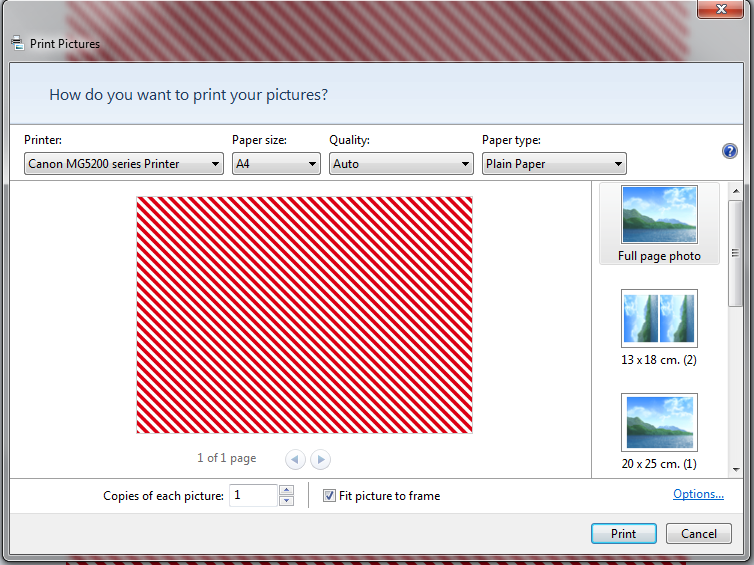
You can enter custom paper sizes in the ‘paper size menu’. You can also choose to print, for example, two copies of the one paper per page (see the second image on the menu on the right of the screenshot above where is says ’13 x 18cm (2)’. If you scroll down this menu it will give you more options such as business card size images.
If you have purchased a binder cover such as this one and want to frame the desktop background/wallpaper or binder cover for some cheap and easy decoration, you can select whatever size you like from the ‘paper size menu’ e.g. 8″ x 10″ 5″ x 7″ ect. Or enter custom dimensions in the ‘paper size menu’
These instructions will work for any jpg image file!
If you get stuck, click on the question mark shown in the screenshot above, Google it, send me a convo on Etsy or email me at allaboutthehouseetsy@yahoo.com.au
Printing Tips
I’ve had a few questions with regards to printing so here are a few printing tips:This post will cover the following:- Borderless printing (to prevent a thin white border around the planner pages)– Printer letter size planner pages at half size– Using the page scaling option for A5, filofax, Erin Condren and custom page sizes– [...]