 Loading... Please wait...
 INR
INR


Recent Posts
How to print printables at Erin Condren planner size from your home printer (step by step tutorial)
Posted on
A question I get asked all the time, is whether my printables can be printed at Erin Condren Planner size. The answer is.. yes!
You can use this same method to print pages at the MAMBI Happy Planner, PlumPaper, Limelife Planner, Day Designer, personal size or any other size you like!

To enlarge the screen of the video, click the square icon in the bottom right hand corner of the video (it will say ‘full screen’ when you hover your mouse over the icon).
For more planner related videos, subscribe to my YouTube channel
HOW TO PRINT PRINTABLES AT ERIN CONDREN LIFE PLANNER SIZE
-
OPEN UP THE PDF FILE YOU WANT TO PRINT
This monthly budget is from my budget planner printable kit which you can read more about here.
WANT TO DOWNLOAD A FREE PRINTABLE TO TRY OUT THIS TUTORIAL? CLICK HERE TO ACCESS THE FREE PRINTABLES LIBRARY.


2. GO TO FILE > PRINT

3. CHOOSE YOUR PRINTER AND SELECT ‘PROPERTIES’
I am using a Canon printer – your printer menu may look a little different depending on what printer brand you’re using (your printer menu may say ‘advanced’ instead of properties)

Related: How to Choose a Printer (Including the best printer for printing printables and planner stickers)
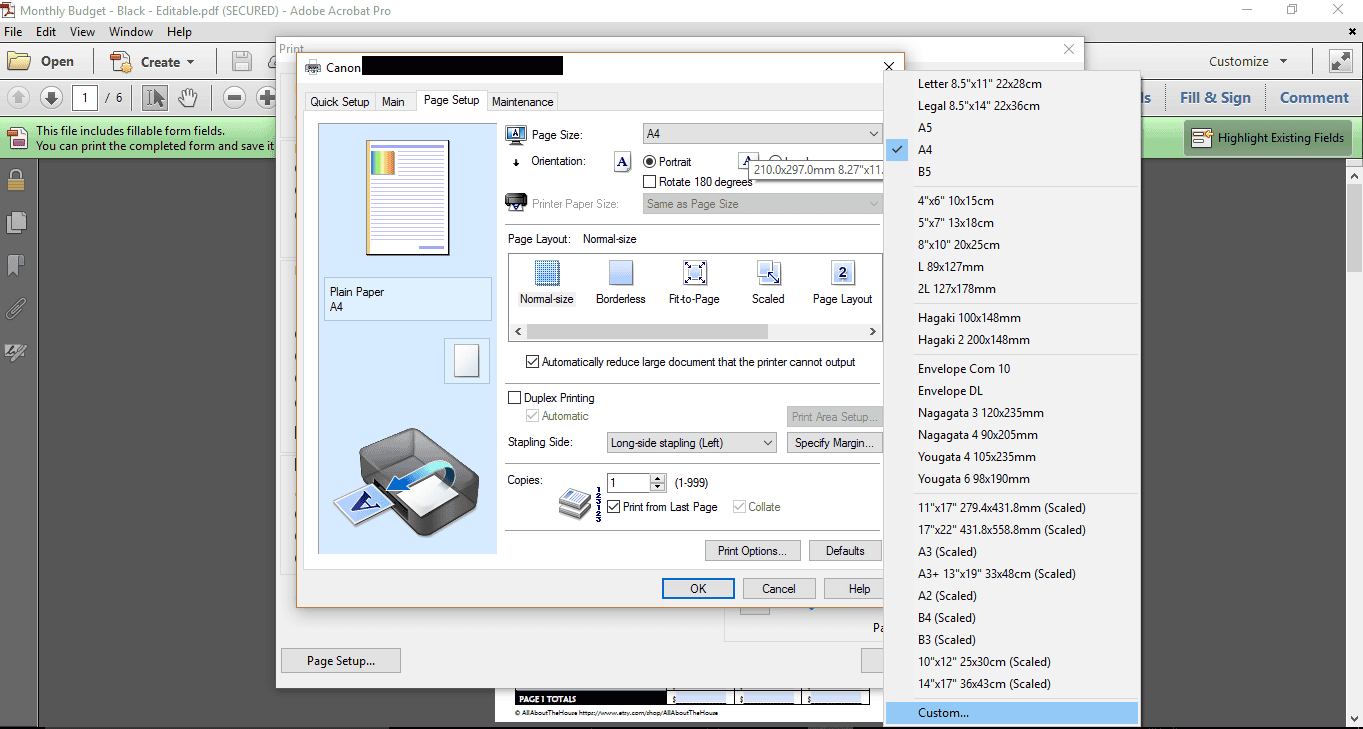
4. GO TO THE CUSTOM PAGE SIZE MENU
Go to > Page Setup > Custom
Related: 7 Ways to make colors POP when printing using an Inkjet printer
5. CHANGE THE DIMENSIONS OF THE PAGE
Enter the dimensions of the size/type of Erin Condren Life Planner you are using then select OK to return to the main printer menu
The spiral bound life planner page size is 7″ wide x 8.75″ high

6. FIT TO PAGE
Back in the main printer menu, make sure ‘fit’ to page is selected

If you’re find stuff is getting cut off, it’s probably because you still have ‘actual size’ selected:

Change from ‘Actual size’ to ‘fit’
You’ll also want to make sure that you have the correct page orientation. Most printers will automatically detect what the correct page orientation is, if not be sure to check/select the correct page orientation before printing

Once you’ve selected the above settings, you’re ready to hit the print button.
Related: Free Printable Erin Condren Vertical Life Planner (or any planner) Ombre Pineapple List Stickers
STEP 7. TRIM THE PAGES TO SIZE
Now all that’s left is to cut the pages using a paper guillotine or paper trimmer, punch and add to your planner. If you’re going to be adding a lot of pages, I recommend cutting them all in one go (a stack of 5 works well) – I use and recommend a paper guillotine.
If you’re looking for stickers to go with your planner, I have tons of printable planner stickers sized at Erin Condren planner size. Printed and kiss cut stickers are available in my sister’s shop, Carefully Crafted (along with a ton of other planner supplies!).
The printables featured in this tutorial are from the budget planner which can be purchased from my shop.
For more printing tips, see this post.
WANT TO DOWNLOAD A FREE PRINTABLE TO TRY OUT THIS TUTORIAL? CLICK HERE TO ACCESS THE FREE PRINTABLES LIBRARY.

WANT TO LEARN HOW TO MAKE YOUR OWN PRINTABLES?
CLICK HERE TO FIND OUT MORE
FOUND THIS POST HELPFUL? PIN IT!
